---
description: >-
How to adjust your lock settings to prevent your content from being found via
your in-store search
---
# Can Locksmith hide content from my in-store search?
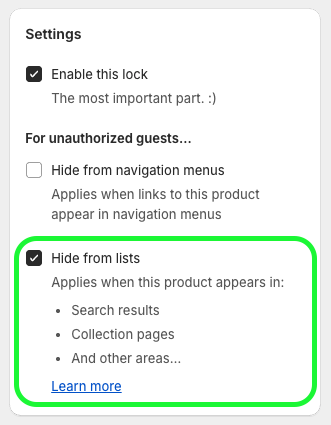
Locksmith includes a checkbox inside of the "Settings" area, on lock pages, that will remove products and other resources from searches - but only from the default and static searches in your store.
{% hint style="warning" %}
**Note**: Locksmith can NOT remove products from display **in other apps**, nor can it remove products from **dynamic (shows results as you type) searches**. In these cases, see suggestions below...
{% endhint %}
You'll find the hide-from-lists setting on each of your lock pages, like so:
## Suggestions for third-party or dynamic searches
Using the above Locksmith setting to 'hide from search results' will _not_ remove the search results when a third party or dynamic search is enabled in your store, so we have some suggestions for alternatives.
### **Dynamic searches(show results as you type) enabled from within the theme settings**
The only option here, if you want to make sure that your locked content is never displayed inside of your in-store search, is to disable the dynamic loading of the products. Each theme is different, but this is typically done within the "search" settings for the theme.
Once you open the Theme Editor, you can find it under your "Search" settings. On the Debut theme, for example, go to:
* Theme Settings > Search > Enable product suggestions (turn OFF)
### **Third party searches**:
Locksmith won’t be able to hide your products from a search in this case, since the third party app is completely responsible for displaying search results when enabled. Suggestions:
* Many third party apps have their own ways to prevent products from showing up in them. Check the settings for the app that you're using! At the very least, they should allow you to remove certain products entirely from appearing in searches, using a specific product tag.
## The "Hide from sitemaps..." setting
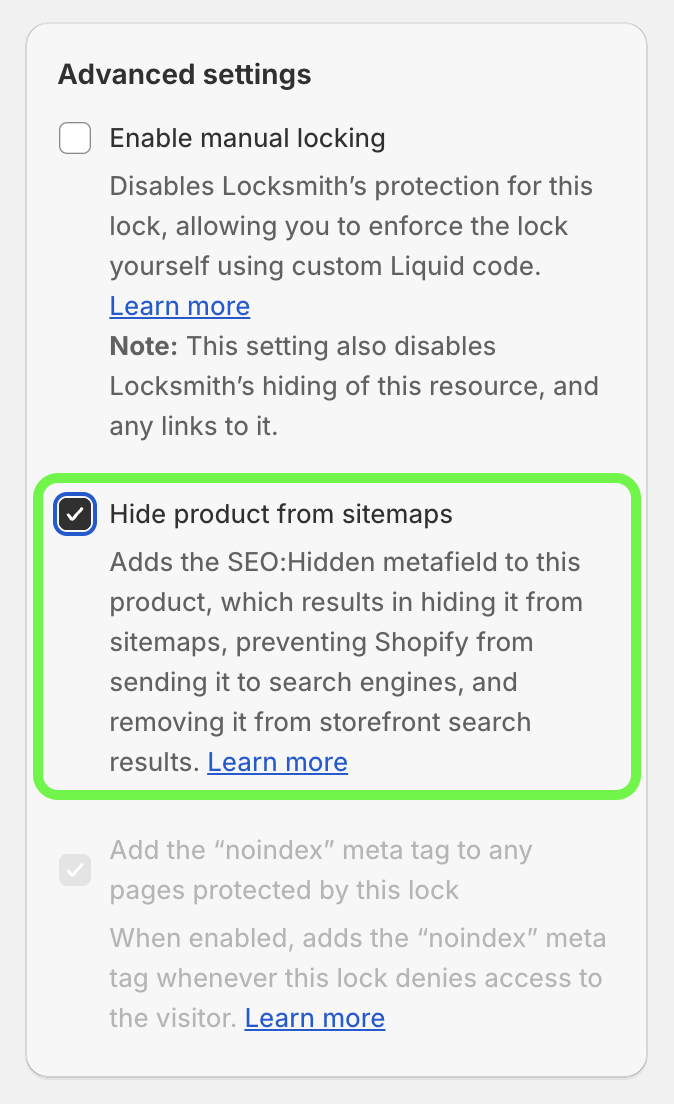
For _product_ and _collection_ locks, Locksmith also gives you the option to hide from sitemaps:
Behind the scenes, this setting uses [Shopify's "seo" metafield](https://shopify.dev/docs/apps/marketing/seo#step-2-hide-a-resource-from-search-engines-and-sitemaps), which removes products from any _in-store_ searches, but also works to remove products from search engines like Google.
{% hint style="warning" %}
**Note**: When enabled, his setting will remove products completely from in-store searches. In other words, **even visitors that have access to the content via Locksmith **_**won't**_** see the products appear in searches.** Because of that, this setting may not work for everyone, but is still available as an option.
{% endhint %}
On collection locks, as long as the '_protect products in this collection_' option is enabled, the setting will also be applied to each product in the collection.
## Related topics
{% content-ref url="more/how-does-locksmith-affect-search-engines-and-seo" %}
[how-does-locksmith-affect-search-engines-and-seo](more/how-does-locksmith-affect-search-engines-and-seo)
{% endcontent-ref %}
{% content-ref url="../tutorials/more/automatically-hide-from-sitemaps-and-manage-seo-metafield" %}
[automatically-hide-from-sitemaps-and-manage-seo-metafield](../tutorials/more/automatically-hide-from-sitemaps-and-manage-seo-metafield)
{% endcontent-ref %}