> For the complete documentation index, see [llms.txt](https://www.locksmith.guide/llms.txt). Markdown versions of documentation pages are available by appending `.md` to page URLs; this page is available as [Markdown](https://www.locksmith.guide/tutorials/more/using-date-and-time-key-conditions.md).
# Using date and time key conditions
Learn how to use Locksmith's "before" and "after" date and time key conditions, including when to combine them within a single key versus adding them as separate keys.
Locksmith includes two key conditions for controlling access by date and time.
* **Is visiting before a certain date and time**\
Grants access if the current time is *before* your chosen date.
* **Is visiting after a certain date and time**\
Grants access if the current time is *after* your chosen date.
These are best for *one-off* moments. Think launches, limited sales, or short blackout periods.
If you need a recurring weekly schedule, use a weekly schedule key. See [Creating weekly schedules](/tutorials/more/creating-weekly-schedules.md).
## How each condition works
### "Permit if the customer is visiting **after** a certain date and time"
This grants access once the date and time has passed. Before that moment, access is denied.
**Example use case**
You're launching a collection on March 15 at 9:00 AM. Add a key that permits access *after* that time:
Before 9:00 AM, visitors see your lock's denial message. After 9:00 AM, the collection opens automatically.
### "Permit if the customer is visiting **before** a certain date and time"
This grants access until the date and time arrives. After that moment, access is denied.
**Example use case**
You're running early access that ends March 20 at midnight. Add a key that permits access *before* that time:
Visitors can access until the deadline. Afterwards, the lock closes automatically.
## Combining date and time conditions
This is where **AND vs OR** matters. For deeper background, see [Combining key conditions](/keys/more/combining-key-conditions.md). You can also read the [overview explanation](https://www.locksmith.guide/basics/overview#chaining-combining-conditions-together-or-versus-and).
Here’s the rule:
* Conditions inside the **same key** use **AND** logic.
* Separate **keys** on the same lock use **OR** logic.
### Use AND to grant access *during* a time window
If you want access only between two dates, use **one key**. Add both conditions to that single key.
**Example**
Open access from March 10 at 9:00 AM. Close it March 17 at 9:00 AM.
Set up one key:
* Permit if it's **after** March 10 at 9:00 AM
* **AND** permit if it's **before** March 17 at 9:00 AM
Access is denied before March 10. Access is denied after March 17.
### Use OR to grant access *outside* a time window
If you want to block access during a period, use **two keys**. No single moment can be both before a start and after an end.
**Example**
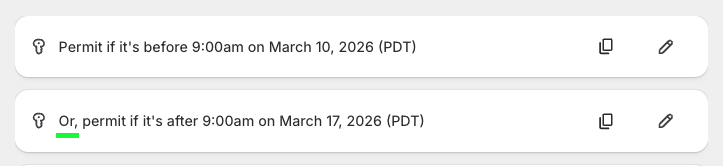
Block access during restocking. Restocking runs March 10 at 9:00 AM to March 17 at 9:00 AM.
Set up two keys:
* **Key 1:** Permit if it's **before** March 10 at 9:00 AM
* **Key 2:** **OR**, Permit if it's **after** March 17 at 9:00 AM
Before March 10, Key 1 grants access. After March 17, Key 2 grants access. During the window, neither key passes.
## Impossible combined time conditions to avoid
{% hint style="warning" %}
**Watch out for impossible conditions.**
If you have time keys combined with "AND", and your "after" time is later than your "before" time, the key never opens. No moment can satisfy both at once.
{% endhint %}
This will never work in a single combined key:
* Permit if it's after March 17
* **And** permit if it's before March 10
If you're trying to allow access outside a window, use two keys instead. See the **OR** example above.
## Quick reference
* Open access **after** a single date\
One key: "after \[date]"
* Open access **until** a single date\
One key: "before \[date]"
* Open access **during** a window\
One key: "after \[start]" AND "before \[end]"
* Block access **during** a window\
Two keys: "before \[start]" OR "after \[end]"
* Recurring weekly hours\
Use a [weekly schedule](/tutorials/more/creating-weekly-schedules.md) key instead
## A note on time zones
Date and time keys use your store time zone. Set it in Shopify under **Settings > General**.
If you need help changing it, see Shopify’s guide:
## Related articles
{% content-ref url="/pages/BbEIkISi5XdTtEe4SKt1" %}
[Creating keys](/basics/creating-keys.md)
{% endcontent-ref %}
{% content-ref url="/pages/ZcLkHf2n32p0GJzwXZME" %}
[Combining key conditions](/keys/more/combining-key-conditions.md)
{% endcontent-ref %}
{% content-ref url="/pages/uiI8pILDTkHLl0vARExA" %}
[Creating weekly schedules](/tutorials/more/creating-weekly-schedules.md)
{% endcontent-ref %}
---
# Agent Instructions
This documentation is published with GitBook. GitBook is the documentation platform designed so that both humans and AI agents can read, navigate, and reason over technical content effectively. Learn more at gitbook.com.
## Querying This Documentation
If you need additional information that is not directly available in this page, you can query the documentation dynamically by asking a question.
Perform an HTTP GET request on the current page URL with the `ask` query parameter, and the optional `goal` query parameter:
```
GET https://www.locksmith.guide/tutorials/more/using-date-and-time-key-conditions.md?ask=&goal=
```
`ask` is the immediate question: it should be specific, self-contained, and written in natural language.
`goal` is optional and describes the broader end goal you are ultimately trying to accomplish on behalf of the user. GitBook uses it to tailor the answer towards what is most useful for that goal.
The response will contain a direct answer to the question and relevant excerpts and sources from the documentation.
Use this mechanism when the answer is not explicitly present in the current page, you need clarification or additional context, or you want to retrieve related documentation sections.